
CAD Packages
Here at Keystone Blue we primarily use the Autodesk Product Design & Manufacturing Collection, with AutoCAD & Inventor as the main programs to produce our engineering packages. The program we prefer completely depends on the project. For mechanical projects such as offshore tooling, conveyors or modular buildings, we would build a 3D model using Inventor. For building layouts or electrical/hydraulic schematics we would choose AutoCAD as these are typically 2D.
There are other programs which offer similar solutions. As an example, Solidworks is quite similar to Inventor and so our engineers have found switching between the two is straightforward. Other similar programs include PTC Creo and Siemens NX.
Workstations
We are living in a time of fast-paced advances in science and technology. CAD software develops so quickly with versions released on an annual basis. An old workstation may already be struggling to keep up with system requirements of modern CAD software. Let’s take a look at workstation specifications versus requirements from 5 years back and compare with now (December 2020). We will use Autodesk Inventor as the example CAD program.
System Requirements
By putting the system requirements for Inventor 2016 (Released 16th April 2015) and 2021 (released 31st March 2020) side-by-side we see just how much more demanding CAD software has become over the years. See the tables below:
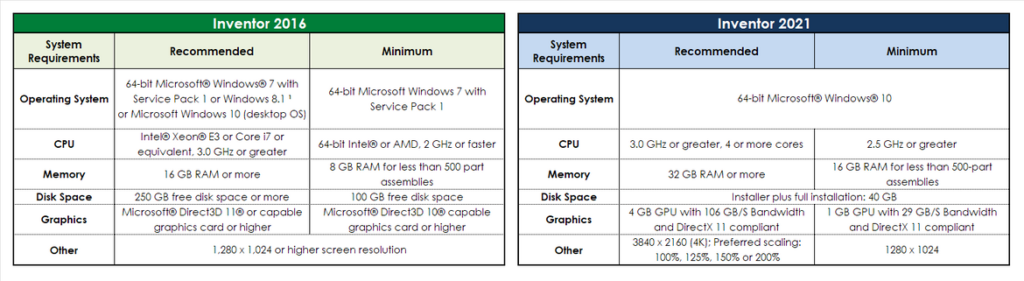
Now we can determine if your workstation from 2015 can comfortably run Inventor 2021. The Dell Precision T5810 Workstation was released in 2014. For around £1,900 this workstation included the following specification:
CPU: Xeon E5-1620 v3 @ 3.50 GHz (4 cores, 8 threads)
RAM: 16GB DDR4 @ 2133MHz
GPU: AMD FirePro W5100 – 4GB VRAM
Storage: 1TB SATA HDD

What Does All This Mean?
Let’s work through the specifications. The Xeon processor in this 5 year old workstation will handle typical Inventor 2021 usage. The RAM, however, is right on the minimum requirements. If you are working with assemblies containing 500+ parts, the RAM in the T5810 is a potential bottleneck. Moving on to the Graphics Processing Unit (GPU), the AMD FirePro W5100 has sufficient VRAM for typical Inventor 2021 operations, though the graphics card bandwidth of 96GB/s means it could struggle to keep up with the software.
Could I Just Upgrade Components?
Certainly, this is one of the many options you have at your disposal. There are some things you need to be aware of before proceeding down this route:
- CPU frequency isn’t everything. CPU technology is developing constantly and so two processors with 3.50GHz frequency can be quite different in terms of performance. For example, compare the above Xeon E5-1620 v3 with a more recent Xeon E3-1230 v6 and you will find that, while they both operate at the same frequency, the latter performs much faster and uses just over half the amount of power.
- Motherboard limitations. The components within your workstation are all connected to the motherboard. Changes in technology can outdate your existing motherboard. An example would be changes in CPU socket. The motherboard for the above workstation would not be compatible with more recent, faster CPUs. Amongst other factors, the memory limits and PCIe configuration of the existing motherboard can prevent upgrading with the latest components.
Upgrading components is a short-term solution to help you meet requirements of a version or two of CAD software. Now let’s look at the benefits and costs of completely replacing your workstation.
A New Workstation
As mentioned earlier, the purchase of a Dell Precision T5810 Workstation back in 2015 would cost around £1,900. According to the Bank of England inflation calculator this is like spending £2,150 in 2020, which is quite the premium for a workstation.
Thankfully, we have managed to spend less than that on a new workstation which includes two 1440p monitors. It also far outperforms the T5810, with all components custom-picked to suit a CAD workstation. See the spec below and how it compares to the 2015 workstation:

What Does the New Workstation Offer?
Working through the table, the CPU base frequency and core count is higher. The CPU in the new workstation also boasts a much faster effective speed. Moving on to the RAM, the new workstation not only doubles in capacity at 32GB, but also works at a frequency much higher than the T5810.
With double VRAM capacity and bandwidth, the newer GPU far outperforms the 2015 workstation.
We have also added storage read and write speeds. Please note that the read/write speeds for the T5810 were taken from a typical 1TB HDD in 2015 and may differ slightly. What you can be certain of is that the Keystone Blue workstation here has much faster read and write speeds than the T5810.
Why Are Storage Read/Write Speeds Important?
Read and write speeds on storage drives determine how fast you can access and store information. For workstations with one single storage drive, the operating system, the CAD program and local files will all be stored on the one drive. The speed at which your computer can load the OS and/or programs is affected by the maximum read/write speeds.
In this case, the 150MB/s read/write limit on the T5810 is not even a consideration on the Keystone Blue workstation.
In Conclusion
Old workstations can be upgraded, but be aware of the limitations of older technology. The increase in system requirements for CAD software is moving at a slower speed than the progress of hardware specification, therefore, in comparison to the system requirements, you can buy much faster workstations today (at the end of 2020) for less money than in 2015.
Each engineering team differs, so before you decide whether to upgrade existing hardware or completely replace all workstations, it may be wise to calculate the costs. For example, if your workstations are slowing your team down, how much money is wasted while they sit and wait due to loading or boot times? A workstation should always be faster than the operator. IT hardware should never be the bottleneck.
It’s also important to be aware that there is much less of a difference between a “Workstation” and a “PC” nowadays. It has been previously advised throughout the industry that CAD users should use hardware specifically designed for workstations – such as Xeon processors and Quadro graphics cards. More recently, however, consumer-grade components (Ryzen CPUs and GeForce/Radeon graphics cards) have been just as suitable for the task – which results in a significant cost saving.
Keystone Blue Example Workstations – 2016-2020
An example of a consumer-grade laptop used as a workstation is one of our “mobile workstations”, the specification of which is:
CPU: Intel Core i7-5700HQ @ 2.70GHz (4 Cores, 8 Threads)
GPU: Nvidia GeForce GTX 970M (3GB VRAM)
RAM: 16GB @ 1600MHz
Storage: Read 497MB/s Write 439MB/s
This workstation could handle small to medium-sized assemblies in Inventor 2018 and 2020 quite well. As the 3D models became more complex there were issues with the software stuttering along with increases in CPU & GPU temperatures.
This workstation is now mainly used for out-of-office meetings or presentations, rather than the day-to-day CAD work.
CAD Workstations in 2021
We can supply custom-built workstations to suit your requirements and budget. Take these for example:
Name: X100
Price: £950
CPU: 3.6GHz 6-Core
RAM: 32GB @ 2666MHz
GPU: 6GB VRAM
Storage: 500GB NVMe SSD
Name: Y100
Price: £1500
CPU: 3.6GHz 6-Core
RAM: 32GB @ 3000MHz
GPU: 8GB VRAM
Storage:
Primary – 500GB NVMe SSD
Secondary – 1Tb SSD
Name: Z100
Price: £2000
CPU: 3.7GHz 6-Core
RAM: 64GB @ 3600MHz
GPU: 16GB VRAM
Storage:
Primary – 500GB NVMe SSD
Secondary – 1Tb SSD
CAD Packages
Here at Keystone Blue we primarily use the Autodesk Product Design & Manufacturing Collection, with AutoCAD & Inventor as the main programs to produce our engineering packages. The program we prefer completely depends on the project. For mechanical projects such as offshore tooling, conveyors or modular buildings, we would build a 3D model using Inventor. For building layouts or electrical/hydraulic schematics we would choose AutoCAD as these are typically 2D.
There are other programs which offer similar solutions. As an example, Solidworks is quite similar to Inventor and so our engineers have found switching between the two is straightforward. Other similar programs include PTC Creo and Siemens NX.
Workstations
We are living in a time of fast-paced advances in science and technology. CAD software develops so quickly with versions released on an annual basis. An old workstation may already be struggling to keep up with system requirements of modern CAD software. Let’s take a look at workstation specifications versus requirements from 5 years back and compare with now (December 2020). We will use Autodesk Inventor as the example CAD program.
System Requirements
By putting the system requirements for Inventor 2016 (Released 16th April 2015) and 2021 (released 31st March 2020) side-by-side we see just how much more demanding CAD software has become over the years. See the tables below:
Now we can determine if your workstation from 2015 can comfortably run Inventor 2021. The Dell Precision T5810 Workstation was released in 2014. For around £1,900 this workstation included the following specification:
CPU: Xeon E5-1620 v3 @ 3.50 GHz (4 cores, 8 threads)
RAM: 16GB DDR4 @ 2133MHz
GPU: AMD FirePro W5100 – 4GB VRAM
Storage: 1TB SATA HDD
What Does All This Mean?
Let’s work through the specifications. The Xeon processor in this 5 year old workstation will handle typical Inventor 2021 usage. The RAM, however, is right on the minimum requirements. If you are working with assemblies containing 500+ parts, the RAM in the T5810 is a potential bottleneck. Moving on to the Graphics Processing Unit (GPU), the AMD FirePro W5100 has sufficient VRAM for typical Inventor 2021 operations, though the graphics card bandwidth of 96GB/s means it could struggle to keep up with the software.
Could I Just Upgrade Components?
Certainly, this is one of the many options you have at your disposal. There are some things you need to be aware of before proceeding down this route:
- CPU frequency isn’t everything. CPU technology is developing constantly and so two processors with 3.50GHz frequency can be quite different in terms of performance. For example, compare the above Xeon E5-1620 v3 with a more recent Xeon E3-1230 v6 and you will find that, while they both operate at the same frequency, the latter performs much faster and uses just over half the amount of power.
- Motherboard limitations. The components within your workstation are all connected to the motherboard. Changes in technology can outdate your existing motherboard. An example would be changes in CPU socket. The motherboard for the above workstation would not be compatible with more recent, faster CPUs. Amongst other factors, the memory limits and PCIe configuration of the existing motherboard can prevent upgrading with the latest components.
Upgrading components is a short-term solution to help you meet requirements of a version or two of CAD software. Now let’s look at the benefits and costs of completely replacing your workstation.
A New Workstation
As mentioned earlier, the purchase of a Dell Precision T5810 Workstation back in 2015 would cost around £1,900. According to the Bank of England inflation calculator this is like spending £2,150 in 2020, which is quite the premium for a workstation.
Thankfully, we have managed to spend less than that on a new workstation which includes two 1440p monitors. It also far outperforms the T5810, with all components custom-picked to suit a CAD workstation. See the spec below and how it compares to the 2015 workstation:
What Does the New Workstation Offer?
Working through the table, the CPU base frequency and core count is higher. The CPU in the new workstation also boasts a much faster effective speed. Moving on to the RAM, the new workstation not only doubles in capacity at 32GB, but also works at a frequency much higher than the T5810.
With double VRAM capacity and bandwidth, the newer GPU far outperforms the 2015 workstation.
We have also added storage read and write speeds. Please note that the read/write speeds for the T5810 were taken from a typical 1TB HDD in 2015 and may differ slightly. What you can be certain of is that the Keystone Blue workstation here has much faster read and write speeds than the T5810.
Why Are Storage Read/Write Speeds Important?
Read and write speeds on storage drives determine how fast you can access and store information. For workstations with one single storage drive, the operating system, the CAD program and local files will all be stored on the one drive. The speed at which your computer can load the OS and/or programs is affected by the maximum read/write speeds.
In this case, the 150MB/s read/write limit on the T5810 is not even a consideration on the Keystone Blue workstation.
In Conclusion
Old workstations can be upgraded, but be aware of the limitations of older technology. The increase in system requirements for CAD software is moving at a slower speed than the progress of hardware specification, therefore, in comparison to the system requirements, you can buy much faster workstations today (at the end of 2020) for less money than in 2015.
Each engineering team differs, so before you decide whether to upgrade existing hardware or completely replace all workstations, it may be wise to calculate the costs. For example, if your workstations are slowing your team down, how much money is wasted while they sit and wait due to loading or boot times? A workstation should always be faster than the operator. IT hardware should never be the bottleneck.
It’s also important to be aware that there is much less of a difference between a “Workstation” and a “PC” nowadays. It has been previously advised throughout the industry that CAD users should use hardware specifically designed for workstations – such as Xeon processors and Quadro graphics cards. More recently, however, consumer-grade components (Ryzen CPUs and GeForce/Radeon graphics cards) have been just as suitable for the task – which results in a significant cost saving.
Keystone Blue Example Workstations – 2016-2020
An example of a consumer-grade laptop used as a workstation is one of our “mobile workstations”, the specification of which is:
CPU: Intel Core i7-5700HQ @ 2.70GHz (4 Cores, 8 Threads)
GPU: Nvidia GeForce GTX 970M (3GB VRAM)
RAM: 16GB @ 1600MHz
Storage: Read 497MB/s Write 439MB/s
This workstation could handle small to medium-sized assemblies in Inventor 2018 and 2020 quite well. As the 3D models became more complex there were issues with the software stuttering along with increases in CPU & GPU temperatures.
This workstation is now mainly used for out-of-office meetings or presentations, rather than the day-to-day CAD work.
CAD Workstations in 2021
We can supply custom-built workstations to suit your requirements and budget. Take these for example:
Name: X100
Price: £950
CPU: 3.6GHz 6-Core
RAM: 32GB @ 2666MHz
GPU: 6GB VRAM
Storage: 500GB NVMe SSD
Name: Y100
Price: £1500
CPU: 3.6GHz 6-Core
RAM: 32GB @ 3000MHz
GPU: 8GB VRAM
Storage:
Primary – 500GB NVMe SSD
Secondary – 1Tb SSD
Name: Z100
Price: £2000
CPU: 3.7GHz 6-Core
RAM: 64GB @ 3600MHz
GPU: 16GB VRAM
Storage:
Primary – 500GB NVMe SSD
Secondary – 1Tb SSD
If you would like to enquire about custom-built workstations to suit your requirements, please do not hesitate to contact us.